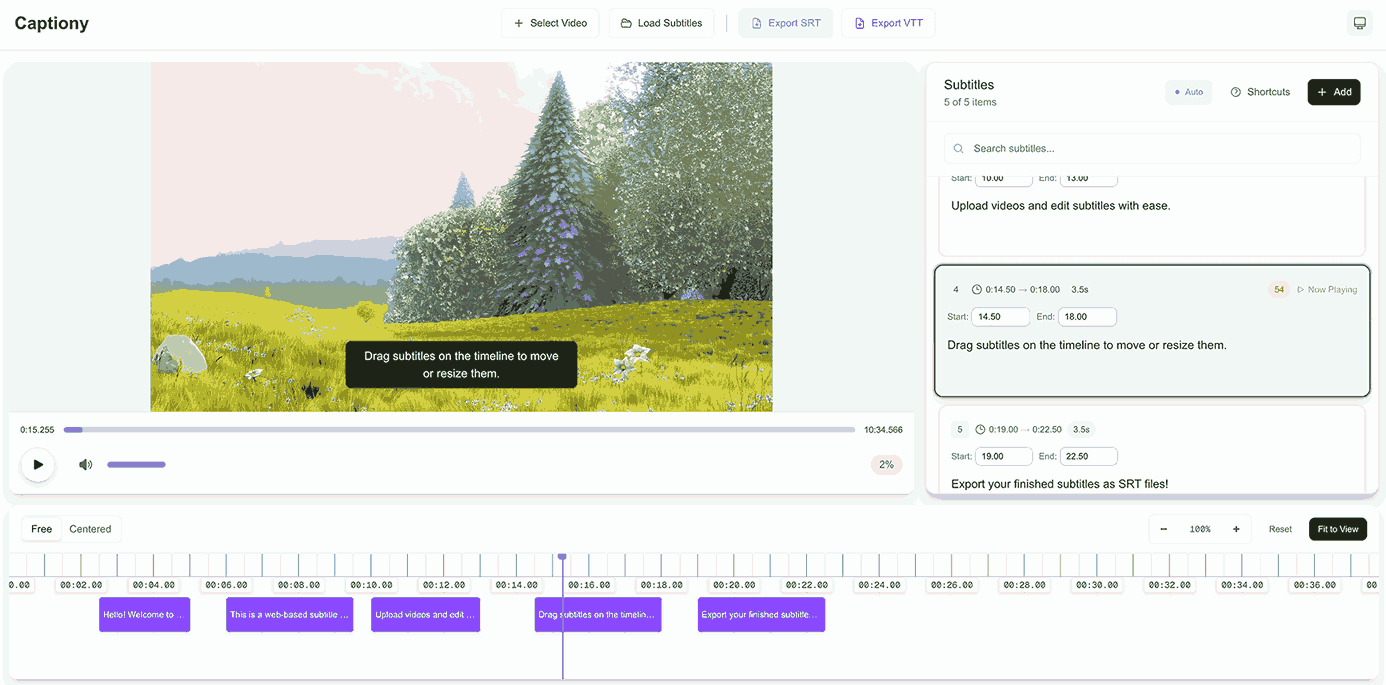
Browser subtitle editor that times SRT/VTT captions on a draggable timeline against a local video or a YouTube link.
Open a video file or paste a YouTube link, lay captions onto a timeline, preview them over the video as you go, and export an SRT or VTT file. No desktop install, no upload to a server.
What’s in it
Timeline editing — drag and resize subtitle bars to set timing, or select several and move them together; zoom in for frame-level precision or out for the whole clip
Two timeline modes — Free (you pan around) and Centered (the playhead stays put while the timeline scrolls under it, which is easier on long sessions)
Live preview — subtitles render over the playing video, so bad timing shows up immediately
SRT & VTT round-trip — import and export both formats
Undo/redo — Cmd/Ctrl+Z and Cmd/Ctrl+Shift+Z; a burst of rapid edits, like fast typing, undoes as one step
Autosave + exit protection — work persists to localStorage, and the page warns before you navigate away
Keyboard-driven — Space to play/pause, ←/→ to seek, ↑/↓ to move between cues, Enter to edit, N to add a cue at the playhead, I/O to set its start or end to the playhead, S to split
The whole editor runs client-side. A local video plays straight from the file you picked and is never uploaded; a YouTube link plays through YouTube’s embedded player.