vaquita is a small macOS app for running Claude Code and Codex side by side. Its sidebar lists every session with what its agent is doing: a spinner while it works, ⚠ when it waits for a permission or an answer, ✓ when a turn is done. A desktop notification fires when one needs you.
The usual way to get that state is hooks. You register commands in each agent’s settings that report every event to your app, and run something that receives them. It works, but it means editing the agents’ config, and it only covers the agents you’ve wired up. I wanted vaquita to run the claude and codex already on the machine and write nothing into their settings. The other way, reading the screen, is fragile: as the proposal below points out, one tool that detects Claude Code by the spinner character in its window title changed that file ten times in three months.
It turned out the agents had just started saying it themselves.
A brand-new status protocol
On October 6, Mitchell Hashimoto proposed OSC 7501, the Program Status Protocol: an escape sequence a program writes to its terminal to say what state it’s in. Claude Code added it in 2.1.295 a couple of days later, and Codex merged it on October 9 (#52725). I started vaquita on October 21.
A report is a list of key=value pairs:
ESC ] 7501 ; state=blocked:kind=permission:app=claude-code:msg=<base64> ESC \
state is one of idle, working, done, blocked and error, or clear to remove a record. blocked carries a kind (permission, question or auth), msg is one line of base64-encoded text, and an id like agent/2 addresses child records such as subagents. The terminal reads them out of the output stream like any other escape sequence. No socket, no config, and it works over SSH.
There’s one catch: a terminal has to say it understands. A program sends ESC ] 7501 ; ? ESC \ and waits for the terminal to answer with the states and kinds it supports. Claude Code asks once at startup, and if the answer doesn’t come it sends nothing at all. Codex reports without asking.
In vaquita the terminals are xterm.js inside a WebKit view, so the app answers the probe. That has a consequence: a session in the background still has to answer. Each session keeps its own terminal parsing output while hidden, and the window opts out of WebKit’s background throttling. I measured why. In a test window answering one query a second, the default policy answered six and then stopped once the window was minimized; with throttling off, it answered all 377 over six minutes, at a median of 8 ms.
Recording before building
Before writing any of the app, I recorded what the agents actually send. A small Python recorder runs Claude Code or Codex in a PTY, answers the terminal queries the way vaquita would, types scripted prompts, and logs every status report with its timestamp: a plain turn, a permission prompt, a question, an Esc to cancel, an exit.
The first round said Claude Code never reports blocked. A permission dialog would appear, and the log showed nothing. So the plan worked around it, with Claude’s separate notification channel (OSC 777) as the signal for input. That channel arrived 6 seconds after the prompt, and its text was the same for a permission and a question.
The recorder was wrong. Its event function took the event’s type as a parameter named kind, so every report that also carried a kind= field raised a TypeError and was dropped. That’s every blocked report Claude Code sends. Fixed, the recordings showed blocked with kind=permission and a message like approve Bash: touch probe.txt arriving 26 to 32 ms before the dialog drew. The design came out simpler: OSC 7501 alone for input, and OSC 777 unused.
“Done” isn’t one event
Waiting for input turned out to be the easy state. Each agent sends blocked before it shows a prompt, and idle when you dismiss it. Knowing when a turn is finished is harder, because the two agents end a turn differently, and neither sends a single clean signal.
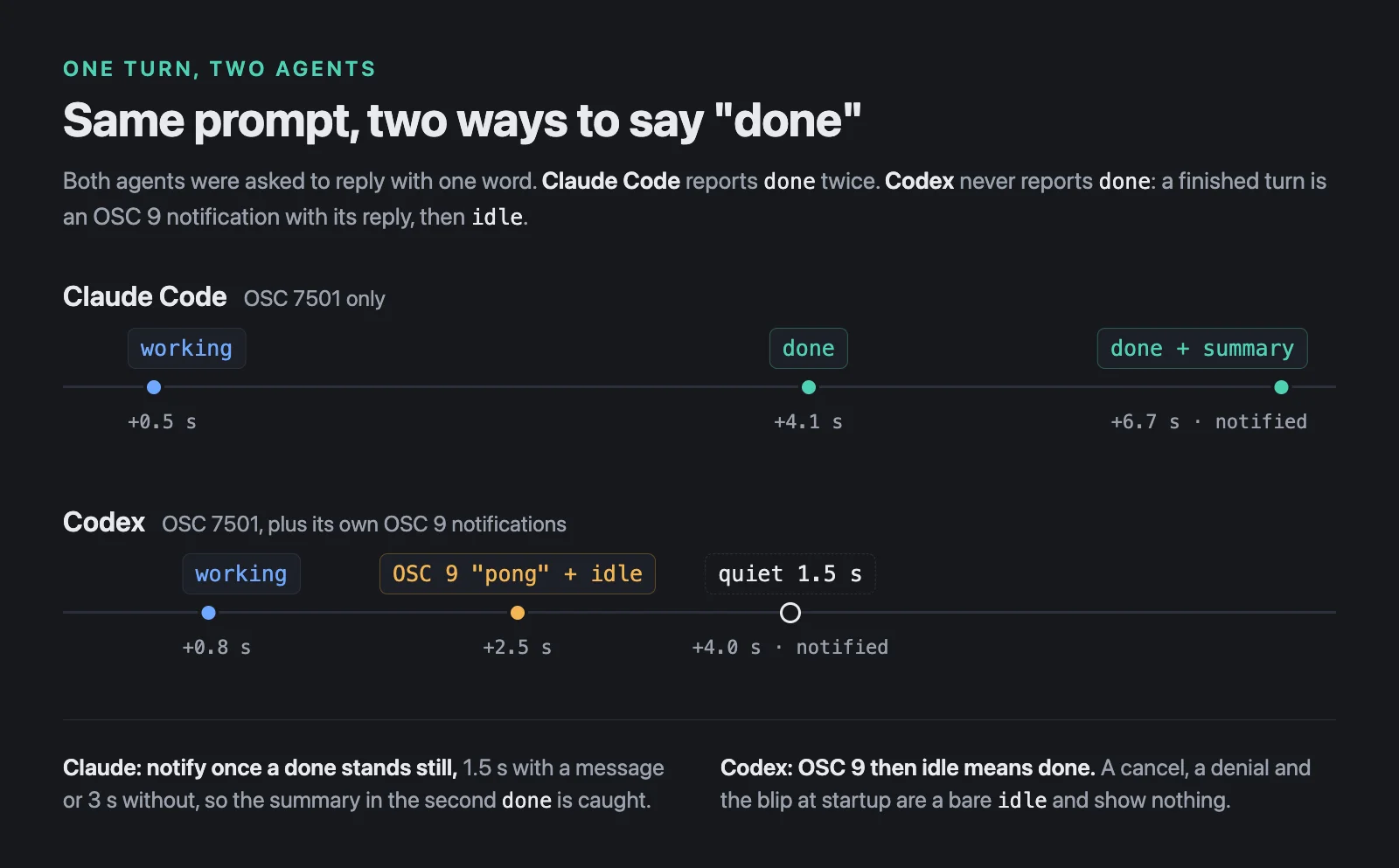
Claude Code sends done twice. For a one-word reply it went working at 0.5 s, done at 4.1 s, then a second done at 6.7 s carrying a summary, replied "pong" as requested. Agents also flicker: a done can be followed by working again as the agent picks something back up. So vaquita shows ✓ at once but holds the notification. A done that ends a turn is notified once it has stood for 1.5 s with a message, or 3 s without one, long enough for the summary to catch up. A second done only updates the message.
Codex never sends done. Its OSC 7501 output is idle, working, blocked and clear, and that’s the whole list. A finished turn goes working → idle. So do a cancel with Esc, a denied permission, and the working → idle blip every Codex session makes right after it starts. From OSC 7501 alone, a finished turn and a cancelled one look identical.
Codex has a second channel, its own terminal notifications, and they can be turned on for one session with -c options instead of a config file. When vaquita starts codex, it adds these, plus one that puts the thread’s name in the window title:
tui.notifications=["agent-turn-complete","approval-requested","plan-mode-prompt","async-question"]
tui.notification_method="osc9"
tui.notification_condition="always"
Now a finished turn writes OSC 9;pong (its last reply) and idle in the same write, while a cancel or a denial is a bare idle. That gives the rule: an OSC 9 followed by idle is done, and the OSC 9’s body is the notification text. An OSC 9 followed by blocked names what the input is for, like Approval requested: /bin/zsh -lc 'touch probe.txt', which fills in the message Codex’s blocked doesn’t carry. Any other idle shows nothing.
The rule broke on the first thing I recorded in plan mode. When Codex asks “Implement this plan?”, it doesn’t report blocked. It writes OSC 9;Plan mode prompt: Implement this plan? and then idle, which by the rule is a finished turn, and the turn sends no completion notice of its own. So an OSC 9 starting with Plan mode prompt: followed by idle is a request for input. Pressing Esc on that popup sends no report at all, so this one view clears when you look at the session.
OSC 9 also isn’t only a notification. Windows Terminal and ConEmu reuse it for commands like 9;4;1;50, a progress bar that Cargo and systemd emit constantly. A body that starts with a number and a semicolon is one of those and is ignored.
A killed agent says nothing
Every rule so far depends on the agent reporting. An agent killed with SIGKILL reports nothing, and the session’s process doesn’t end either, because the PTY’s child is the shell the agent runs under. Without another signal, a killed agent would spin in the sidebar forever.
So while an agent has reported anything, vaquita polls the PTY’s foreground process group once a second. The agent runs as a foreground job of its own, and once the shell has taken the terminal back, the agent is gone. Checking the process group alone wasn’t enough: Claude Code starts caffeinate, which can outlive it in the same group for minutes. Then the leftover working or blocked view is cleared, and so are the terminal modes the agent left on. That last part matters more than it sounds. With mouse tracking still on, every mouse move over the terminal types an escape sequence into your shell.
What this doesn’t cover
- Typing
codexyourself. The-coptions only go on sessions vaquita starts, so acodextyped into a plain shell session has no OSC 9, and its turns can’t be told from cancels. - tmux. OSC 7501 probably doesn’t make it out of tmux, though I haven’t tested it. vaquita doesn’t run sessions inside it.
- Versions. The recordings are of Claude Code 2.1.308 and Codex 0.163.0. Both implementations are about two weeks old, and details like Claude’s second
donecould change. - Anything beyond state. OSC 7501 says what an agent is doing, not what it was asked. If you need the prompt, or the session id to resume a conversation, hooks are still the direct way. vaquita gets the conversation id another way, from files the agents already keep, which is a story for another post.
For what a sidebar needs, though, the agents were already saying it. vaquita answers one probe, adds a few options to codex, and reads the rest from the output it’s already drawing.
vaquita is at 0.1, for Apple Silicon Macs only, and I use it every day for my own work. If you try the latest release and something breaks, an issue helps a lot.