vaquita Unit 27
A lightweight macOS app for running Claude Code and Codex side by side, with every agent's state in one sidebar (working, waiting for you, or done) and no hooks to install.
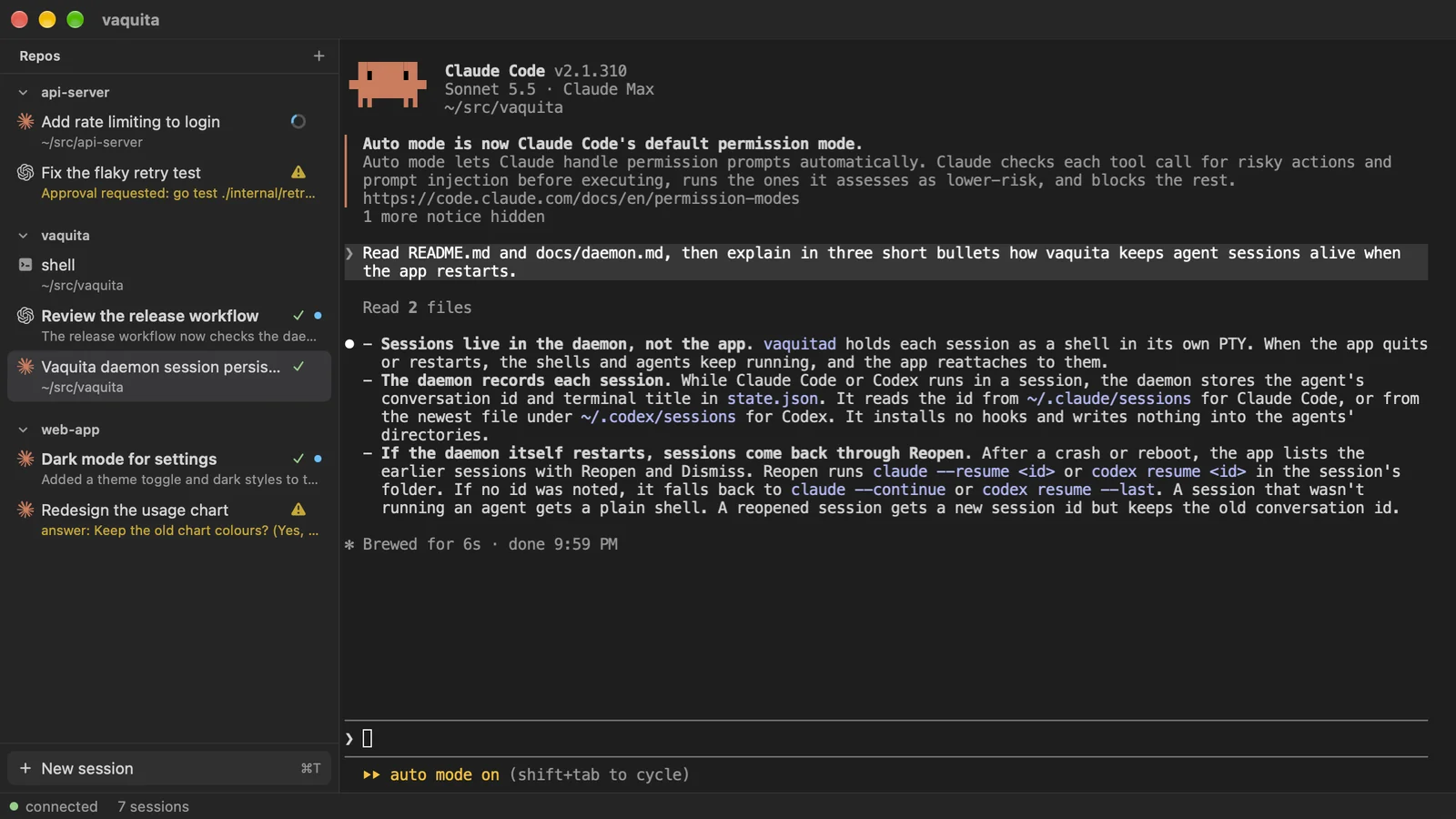
vaquita is a small desktop app for running AI coding agents, Claude Code and Codex CLI, side by side in the repos they work on. The sidebar lists each repo with its sessions under it, and every session shows what its agent is doing: a spinner while it works, ⚠ with the permission or question it’s waiting on, ✓ or ✗ when the turn ends, and a dot until you’ve looked. A Go daemon holds the terminals, so agents keep running when the app quits. It runs the claude and codex you already have, writes nothing into their settings, and the latest release is a zip of about 7 MB for Apple Silicon Macs.
Status from escape sequences, not hooks
Everything the sidebar knows comes from what the agents already print to their terminal. The daemon runs each session’s output through its own scanner, which follows the escape-sequence structure without emulating a terminal, and picks out three things:
- OSC 7501 status reports. The app’s terminal answers the agent’s
OSC 7501 ?probe with the states and kinds it understands, and the reports say idle, working, done, error, or blocked on a permission, a question or a login, with a message to show. - Codex’s OSC 9 notifications. A session whose command starts with
codexgets-coptions that turn them on for that session only: finished turns, approval requests, plan-mode prompts and questions. - Window titles, which name the session: Claude Code’s topic for the conversation, or Codex’s thread name, which those same options make the title.
OSC 9 needs a filter, since Windows Terminal and ConEmu reuse it for things like 9;4 progress bars that Cargo emits constantly; a numeric first field means it isn’t a notification. The scanner keeps at most 4 KB of a status report and abandons any string that hasn’t ended after 64 KB, so runaway output can’t grow its memory, and both it and the output path around it have fuzz tests.
Telling a finished turn from a dead agent
The two agents end a turn differently. Claude Code sends done, then a second done with a summary about 2.5 seconds later. Codex never sends done: a finished turn is an OSC 9 carrying its last reply followed by idle, while a cancel or a denial is a bare idle. So a done is only notified after a working, once it has stood for 1.5 seconds with a message or 3 seconds without one, because agents flicker from done back to working. An idle only means done for Codex, right after an OSC 9.
An agent killed with SIGKILL reports nothing. While one is up, the daemon polls the PTY’s foreground process group every second, and once the shell has the terminal back, the agent is gone. Its working or waiting state is cleared, and the terminal modes it left on are undone; with mouse tracking left on, every mouse move over the terminal would type into the shell. The process group alone isn’t proof, since a helper like the caffeinate Claude Code starts can outlive the agent there for minutes.
A daemon holds the terminals
Each session is a shell in its own PTY inside vaquitad, which launchd runs. The release app installs that LaunchAgent itself, with the vaquitad from its own bundle, and the plist stays in vaquita’s folder rather than ~/Library/LaunchAgents, so nothing starts at login. The app connects over a WebSocket on 127.0.0.1: a random port, a token in an owner-only endpoint.json, and an Origin check that admits the Tauri webview. Output travels as binary frames with a 9-byte header: type, session id and generation.
- Replay that starts on a clean edge. Every session keeps its last 1 MB of output in a ring buffer, so a reconnecting app gets its screens back by replay. Cutting into an escape sequence or a UTF-8 character would garble that, so the scanner records cut boundaries as output arrives and eviction moves the ring’s start to one where it can. A second scanner reads exactly the bytes the ring evicts, so it knows which modes were in effect at the start (alternate screen, mouse tracking, bracketed paste, the kitty keyboard flags), and the replay sets them first.
- Backpressure. The app acknowledges output once xterm.js has parsed it, and the daemon stops sending at 1 MB unacknowledged, so a program flooding its terminal can’t grow the webview’s write queue without bound.
- One writer.
vaquitad attachcan watch a session from another terminal, but only one client takes input and resizes, the app whenever it’s connected. Only its terminal’s answers to queries reach the program, so a byte is never answered twice. - Updates that don’t kill sessions. When the app brings a different daemon build, it swaps the daemon only while no session is running, and the daemon agrees to stop only if that’s still true. Otherwise a bar offers the restart, since running sessions end with it.
Resuming the conversation after a reboot
Sessions outlive a daemon restart as records in state.json. While an agent runs, the daemon notes its conversation id, the one --resume takes, without asking the agent. Claude Code keeps a file per process under ~/.claude/sessions, so the daemon reads it by pid, and rejects one that claims a start more than 15 seconds before that process’s own: a SIGKILLed claude leaves its file behind for whatever gets the pid next. Codex has no such file, so the daemon takes the newest conversation file under ~/.codex/sessions that started in the session’s folder since the session began and isn’t claimed by another session, reading at most 200 files. That can occasionally pick another conversation, and the docs say so.
After a crash or a reboot, the app lists the earlier sessions with Reopen and Dismiss. Reopen runs claude --resume <id> or codex resume <id> in the same folder, falls back to claude --continue or codex resume --last when no id was noted, and gives a session that ran no agent a plain shell. Right after a crash, agents still shutting down can hold a session’s processes, so the daemon checks those sessions again over the first 15 seconds and makes them reopenable once they’re gone.
xterm.js inside WebKit
The app is Tauri 2 with Svelte 5 and xterm.js, so every terminal lives in macOS’s WKWebView, which needed a few fixes of its own.
- Korean input. WebKit’s macOS Korean IME sends no composition events: a syllable starts with an
insertText, and every later jamo replaces it with aninsertReplacementText, which xterm.js ignores. vaquita holds the syllable being composed, draws it over the cursor, and sends it once the next one starts or anything else is about to go out. The IME’s behaviour was checked first in a WKWebView test bed intools/probe. - Background sessions. Each session has its own xterm.js terminal that keeps parsing output while hidden, so its agent’s status probe and colour queries still get answers, but only the one on screen has a WebGL context. A terminal never shown is never opened, and xterm.js only answers colour queries once opened, so the app answers OSC 10, 11, 12 and palette queries itself.
- File links from untrusted output. ⌘-click opens a path or a
file://link in its default app, and the daemon setsFORCE_HYPERLINK=1so agents emit those links. The Rust side resolves the path first, then reveals it in Finder instead when opening it could run something: an executable, anything in an app bundle, a script, a stored link like.webloc, or a file whose default app runs or installs what it opens, such as Terminal, Installer or Shortcuts.
About 200 MB for ten sessions
Measured with a release build: 10 shell sessions of about 300 lines each, one on screen, left idle for a minute. The app, its three WebKit processes and the daemon came to about 200–230 MB of memory together (about 30 MB for the app, 190 for WebKit, 11 for the daemon), and idle CPU was 0.5% of one core with a terminal on screen, where the cursor blinks, and 0.02% without. The daemon is built without its symbol table and DWARF, which makes it a third smaller.
vaquita is at 0.1.2, Apple Silicon only. The app is signed with a self-signed certificate and not notarized, so the README has the one command that clears its quarantine flag. Updating means replacing the app; it takes care of the daemon.